

Thumb & Pen Drives · Chip-Off & Monolith Capable
USB Flash Drive Recovery Singapore
Dead, not detected, or snapped USB drive? We recover thumb and pen drives at the chip level — including monolithic drives — in our cleanroom lab. Free diagnosis.
4.9 / 5915 reviews · 20+ years · cleanroom lab (opens Google in a new tab)- Chip-off & monolith
- Snapped connectors
- Free diagnosis
- Fixed written quote
Quick answer
Yes — most dead and undetected USB flash drives are recoverable, including drives with snapped connectors, failed controllers, or physical damage. We read the NAND directly via chip-off and monolith recovery when needed. Diagnosis is free; you approve the fixed quote before any work begins. Don't keep re-plugging it, and don't format it.
Overview
Only copy on a dead USB drive? It's usually recoverable.

USB flash drives fail more often than people expect — they're small, physically abused, and often hold the only copy of important files. A drive that isn't detected, asks to be formatted, or has a snapped connector hasn't necessarily lost its data: the NAND flash chips inside usually still hold everything.
CBL recovers USB drives at every level — from logical corruption to controller failure, snapped connectors and monolithic drives where the entire drive is a single sealed chip. When a drive won't cooperate, we read the raw NAND directly and rebuild the data.
If your USB drive isn't detected
Stop re-plugging it and don't format it. Repeated attempts can stress a failing controller, and formatting overwrites the file structure. Then book a free diagnosis.
Same problem, different words
Thumb drive recovery, pen drive data recovery, USB stick repair — what people actually mean
People describe this device by whatever name they grew up with, and all of them arrive on our bench. The word you use changes nothing about the job. Two of the distinctions below genuinely do.
"Thumb drive", "pen drive", "flash drive", "USB stick", "memory stick"
All the same object: a small circuit board carrying NAND flash memory and a controller chip, wrapped in plastic or metal, with a USB plug on one end. Thumb drive recovery Singapore, pen drive data recovery and USB flash drive recovery are three ways of asking for exactly the same service. "Memory stick" was originally a Sony camera format, but almost everyone now uses it to mean any USB stick.
"USB repair" versus "USB recovery"
This is the distinction that matters most, and it is the one people most often get wrong. It usually means one of two very different things:
- Repairing the drive so you can keep using it. Honestly — don't. A flash drive that has failed once has told you something about its build quality and its remaining write endurance. The stick costs a few dollars to replace. Your data does not.
- Repairing the drive far enough to read the data off it. That is what we actually do. Re-soldering a snapped connector, bypassing a dead controller, lifting the NAND — all of it is a means to one end, which is a clean copy of your files on media you keep.
So when we talk about repairing flash drives, we mean the second one. You get your files back on fresh media; the failed stick is yours to bin or shred.
Flash drive, portable SSD, or a card in a reader?
Everything with a USB plug looks alike in Windows, but three quite different devices hide behind that connector. A true flash drive has its NAND soldered inside the housing. A portable SSD — a Samsung T7, a SanDisk Extreme, a My Passport SSD — is a real SSD behind a USB bridge board, and needs SSD recovery methods instead. A microSD card in an adapter is a card; see SD and memory card recovery. Telling them apart is part of the free diagnosis.
One thing that genuinely does matter
Not the words you use, but what has been written to the drive since the trouble started. A flash drive has no moving parts, so leaving it unplugged costs you nothing. One format, one CHKDSK or one vendor "repair tool" can overwrite the very tables we rebuild your files from.
Diagnosis
Why USB flash drives fail
Snapped / broken connector
The USB plug breaks off or the solder joints crack.
Controller failure
The drive isn't detected — the controller died but the NAND is intact.
Corruption / "format disk"
Logical corruption from unsafe removal; drive shows as RAW.
Water / physical damage
Washed in laundry, crushed or bent.
Warning signs
USB not detected, blinking or asking to be formatted — what each symptom means
Flash drives fail in a small number of recognisable ways. What the drive does the moment you plug it in tells us a great deal about what has gone wrong inside — and how urgent it is.

- Nothing at all: no LED, no connection sound. Usually a dead controller, or cracked solder joints where the USB plug meets the board. Both leave the NAND untouched, which is why these are often the most recoverable cases of all.
- USB not detected, but the light still comes on. The controller is drawing power and may enumerate as an unknown device, yet cannot present a volume. Common after a power surge, or when the controller's own firmware has become corrupt.
- "Please insert a disk into drive E:". Windows can see a device but is being told it holds no medium. On a flash drive that nearly always means the controller has lost the translation table — the map between logical sectors and physical NAND pages.
- "You need to format the disk before you can use it", or the drive shows as RAW. The FAT32 or exFAT structures at the start of the drive are damaged, typically after being pulled out mid-write. Your files are still there. Formatting is the one thing that will change that.
- Reports 0 bytes, or the wrong capacity. A 64GB drive showing as 8MB means the controller has dropped into a safe or default mode. Nothing you can do from the computer will bring the real capacity back.
- It mounts, then drops out mid-copy — sometimes warm to the touch. An intermittent joint, or a controller failing under load. The most time-sensitive symptom on this list: each mount may be the last one you get.
- Files are listed, but open as gibberish or zero bytes. The directory survived while the data blocks are failing their error correction — worn NAND, common in cheap or heavily used drives.
If it comes and goes, stop now
An intermittent drive is not a drive that is getting better. Every mount spends part of whatever life is left in a cracked joint or a dying controller. An unplugged flash drive, by contrast, loses nothing by waiting.
Critical
What NOT to do with a failing USB drive
Repeated re-plugging
Stresses a failing controller and can worsen the fault.
Formatting when prompted
"Format disk?" overwrites the file structure — never format.
DIY soldering the connector
Amateur soldering can damage the NAND pads and make chip-off harder.
Running CHKDSK on it
Can corrupt a fragile, failing drive further.
Why each of these does real damage
None of these are superstitions. Each one has a specific mechanism, and each turns a straightforward job into a harder one — or an impossible one.
- Re-plugging a drive that is not detected. Every mount asks the controller to run its initialisation routine again. On a stick with a cracked solder joint, the flexing plug can break the last surviving connection. On a failing controller, a half-completed initialisation can rewrite the translation table inside the NAND — the map we need to put your files back in order.
- Accepting the format prompt. Formatting writes a fresh, empty file system over the top of the damaged one. The old directory entries are marked as free space, and the drive is then entitled to recycle those blocks during its own housekeeping. Recovery after a format is still possible; it is simply harder, with a poorer result than the same drive untouched.
- Running CHKDSK or a "repair" utility. CHKDSK exists to make a file system self-consistent, not to save your files. On an unstable flash drive it deletes the entries it cannot verify and dumps orphaned fragments into FOUND folders with numbers instead of filenames.
- Using a manufacturer format tool or an MPTool. These low-level utilities reflash the controller's firmware and rebuild its mapping from scratch. They can indeed make a dead-looking drive usable again — and completely empty. Never run one on a drive that still holds data you want.
- Re-soldering the connector yourself. A snapped plug is one of the most recoverable faults there is, right up until an iron that is too hot lifts the copper pads clean off the board. Those pads are exactly where we attach. Excess heat can also cook the NAND package or bridge its pins.
How it works
Our USB recovery process

Step 1: Free diagnosis
We identify the fault — connector, controller, NAND or logical — and confirm recoverability. No cost, no obligation.
Step 2: Repair or bypass
For snapped connectors we repair the joint; for controller failure we attempt access, or proceed to chip-off.
Step 3: Chip-off / monolith (if needed)
We desolder the NAND (or expose the monolith's contact points) and read it directly, then reconstruct the data accounting for wear-levelling, XOR and ECC.
Step 4: Reconstruct & extract
We rebuild the file system and extract your files, then provide a list to verify.
Step 5: Verify & return
Verified data returned on fresh media.
More on the lab: how professional data recovery works →
Honest expectations
What we can recover — USB scenarios
| Scenario | Method | Typical outcome |
|---|---|---|
| Not detected / controller failure | Access or chip-off | High |
| Snapped / broken connector | Connector repair | High |
| Corrupt / RAW / "format disk" | Logical reconstruction | High |
| Monolithic USB drive | Monolith contact / chip-off | Case-by-case |
| Severe physical / NAND damage | Assessed individually | Reduced |
Also recovering memory cards? See SD & memory card recovery, or deleted file recovery.
Brands & internals
Brands, controllers and what is actually inside your drive
The name printed on the casing tells us less than what is on the board underneath. We handle every mainstream brand, and a great many unbranded ones.
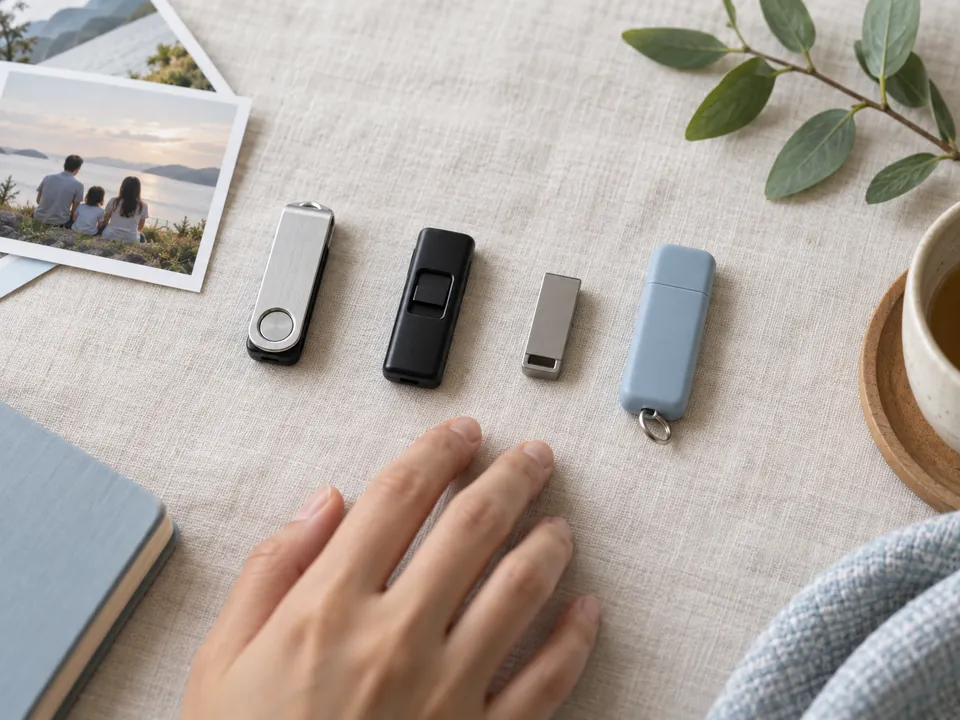
Brands we see most in Singapore
- SanDisk. Cruzer, Ultra, Ultra Fit and Extreme — by some distance the most common drive we receive. The very small models are almost always sealed single-package units, which changes the method entirely.
- Kingston. The DataTraveler family in all its variants, plus the encrypted IronKey and Locker ranges — recoverable, but only with your password.
- Samsung. BAR Plus and FIT Plus. Metal-bodied and generally well made; failures here are more often connector or controller than worn-out NAND.
- Sony, Toshiba and Kioxia. Micro Vault and TransMemory sticks, still common in office drawers and camera bags. Transcend, PNY, Lexar, Verbatim and Corsair are all routine work too.
- Unbranded and promotional drives. Conference giveaways and marketplace bargains use whichever NAND and controller was cheapest that month, occasionally with a falsified capacity written into the firmware. Still recoverable, but outcomes vary more, and we say so at diagnosis rather than after.
Controllers: Phison, Silicon Motion, Alcor and the rest
Behind almost every flash drive sits one of a handful of controller families — Phison, Silicon Motion, Alcor Micro, Innostor, or a manufacturer's own design inside SanDisk and Samsung units. The controller decides how your data is scattered across the NAND: page order, block interleaving, error correction and the XOR pattern the contents are scrambled with. After a chip-off, all of that has to be reversed before a single readable file appears. A familiar controller means a known scheme and a faster rebuild; an obscure one means deriving the pattern from the raw dump itself.
Monolithic or discrete — the factor that decides everything
- Discrete. A separate NAND chip (TSOP48 or BGA) and a separate controller, soldered to a small circuit board. If the controller is dead we desolder the NAND, read it in a programmer and rebuild from the raw dump. This is classic chip-off, and it works well.
- Monolithic. Controller and NAND are moulded into one sealed block, so there is no chip to remove. Recovery means locating the drive's technological test points on the body, wiring directly to them, and reading the NAND through that connection. It works — but it is delicate, model-specific and genuinely case-by-case.
Most slim, tiny and inexpensive drives made in recent years are monolithic. That is precisely why we diagnose before quoting rather than after, and why a snapped monolith is a different conversation from a snapped discrete drive.
Transparent pricing
How much does USB recovery cost?
| Case type | Examples | Indicative range (SGD) |
|---|---|---|
| Logical | Corruption, RAW, deleted files | $150 – $500 |
| Connector / controller | Snapped plug, not detected | $200 – $600 |
| Chip-off / monolith | Dead drive, physical damage | $200 – $600 |
Free diagnosis = free quote
Exact fixed price before work begins. Full detail: data recovery cost guide →
Honest guidance
DIY: when it's safe vs when to stop
Safe to try yourself: if the drive is still detected and just has deleted files or minor corruption — and the files aren't your only copy — reputable recovery software is reasonable. Stop and call us if: the drive isn't detected, the connector is broken, it asks to be formatted, or the files are irreplaceable. See DIY vs professional recovery.
Recovery in the real world
USB recovery case studies
Representative examples from typical laboratory cases. Anonymised.
Bugis · Student
Snapped USB — final-year project
The USB plug snapped off inside a laptop port. We repaired the connector joints, accessed the drive and recovered the project files.
100% recovered
CBD · Consultant
Not-detected monolith drive
A monolithic USB stick stopped being detected. We exposed the contact points, read the NAND directly and rebuilt the data.
Files recovered
Tai Seng · Home user
"You need to format this disk"
A USB drive showed as RAW after unsafe removal. We reconstructed the file system without formatting and restored the photos.
Photos recovered
Recovery in the real world
Real USB flash drive recoveries
From verified 5★ reviews on our Google Business Profile. Names as published on Google.
Pendrive · broken
Everything off a broken pendrive
A broken pendrive brought in for recovery. All the data came back, and in a short amount of time.
All data recovered
James Teoh via Google
USB · family photos
Precious family photos off a faulty USB
A faulty USB holding many precious family photos. The owner was kept updated throughout — from first engaging us, to progress checks, to the final call confirming everything was done.
All contents recovered
Iris Shen via Google
USB · sent from Johor Bahru
Work files saved over the holidays
A damaged USB drive sent from JB across to Singapore. The engineers retrieved the work files over the holiday period.
Work files recovered
jas peng via Google
From verified Google reviews
These are real reviews from our customers on Google (4.9★ from 915), shown as testimonials.
The honest comparison
CBL vs a reseller vs DIY software
Flash drives are the device where the gap shows up fastest — because the moment the drive stops being detected, software has nothing left to work with.
A shop that accepts your drive and posts it onward is not necessarily doing anything wrong — but you lose a week, and you lose sight of who is handling it. Our chip-off and monolith work happens at 6 Harper Road, done by the engineers who diagnosed it, and the drive never leaves Singapore.
Zero-risk guarantees
Free diagnosis & a fixed written quote
Free Diagnosis
We assess your USB drive — no cost, no obligation.
Work Stays In-House
Recovered in our in-house Singapore lab — never shipped overseas.
Fixed Quote First
A firm written price before any work begins. No hidden fees.
Answers
USB recovery FAQ
In most cases yes — including drives that aren't detected. The NAND usually still holds your data, and we read it directly via chip-off if needed. A free diagnosis confirms your case.
No — formatting overwrites the file structure. The drive is usually just corrupted (RAW); we reconstruct the file system without formatting.
Yes — a broken plug or cracked solder joint is a common, highly recoverable fault. We repair the connection or read the NAND directly.
Yes — we desolder the NAND (or contact a monolithic drive) and read it directly, then rebuild the data accounting for wear-levelling, XOR and ECC.
The drive itself is cheap — the value is in your data. If the files are important and there's no other copy, recovery is usually worth it. Our free diagnosis and fixed quote remove the risk.
Indicatively $150–$500 for logical, $200–$600 for connector/controller, and $200–$600 for chip-off. Your free diagnosis gives an exact fixed quote.
The computer can see a USB device but is being told it contains no medium. On a flash drive that nearly always points at the controller: it has lost or can no longer read the translation table that maps logical sectors to physical NAND pages, so it reports itself as an empty reader. The memory itself is usually intact. Do not run a vendor format tool to "fix" it — those rewrite the controller's own tables. We read the NAND directly and rebuild the mapping in the lab.
Logical cases — RAW volumes, corrupt file systems, deleted files — are often finished within a few working days. Connector repairs are usually quick once the joint is stable. Chip-off and monolith work takes longer, because reading the raw NAND is only the beginning: the dump then has to be reassembled according to that controller's page order, interleaving, error correction and XOR pattern. Your free diagnosis comes with a realistic time estimate alongside the fixed quote, and we will tell you up front if yours is going to be a slow one.
Often, yes. Water does not erase NAND. The damage comes from corrosion over time, and from short circuits if the drive is powered up while still damp — so do not plug it in to test it, and do not dry it with heat. We clean the board, deal with any corrosion, and if the controller is beyond saving we read the memory directly. The same applies to drives dropped in the sea or in a drink; salt and sugar are far more aggressive than plain water, so sooner is much better than later.
Sometimes, and we would rather be straight with you about when. If the break is at the plug end and the body is intact, the odds are reasonable — we work from the board or the memory directly. If the body itself is cracked through on a monolithic drive, the internal traces and the test points we would wire to may be severed, and there is no separate memory chip to fall back on. This is where the free diagnosis matters most: we can usually tell you within a day whether it is worth attempting.
We can recover the encrypted container, but we cannot break the encryption. For BitLocker To Go, SanDisk SecureAccess, Kingston IronKey and similar products you need the password or recovery key. With it, your files come back normally; without it, what we return is unreadable ciphertext. If your drive is BitLocker-protected, see BitLocker recovery. Bring any password, key file or recovery key you still have to the diagnosis.
Yes. All work is done in our own laboratory in Singapore — nothing is sent overseas to a partner lab. Access is limited to the engineers assigned to your case, we can sign an NDA on request, and your recovered data is returned on media you keep. Once you have confirmed the recovery is complete, we erase our working copies on your instruction.
What our clients say
Trusted by individuals and businesses in Singapore


Business Profile
USB Flash Drive Data Recovery – Rated by customers on Google
915Google reviews
4.9 out of 5
Updated 4 Nov 2026
“Thank you to the team at CBL for helping me recover all the contents from my faulty USB, which contained many precious family photos.”
Iris ShenUSB flash drive recovery · via Google “Great relief the engineers managed to recover all my data successfully from my damaged iPhone 14.”
Peter AndroidiPhone 14 recovery · via Google “Amazing service from CBL. They have restored all the data from my laptop. Sarah was very helpful and attentive to my queries.”
S YTLaptop recovery · via Google

The bottom line
A dead USB drive rarely means dead data — the NAND usually survives. Stop re-plugging it, don't format it, and let CBL take a look. With chip-off and monolith capability and a free diagnosis, there's no risk in finding out.