
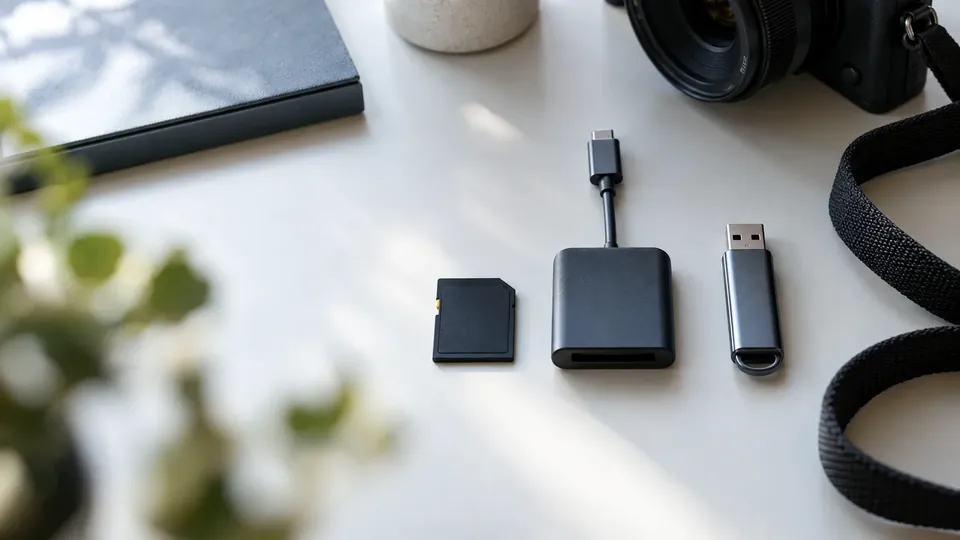
USB vs SD card, explained
USB Flash Drive vs SD Card: What's the Difference? (2026)
USB flash drives and SD cards both store your files on flash memory — so what's actually different, and which should you use? Here's a clear 2026 comparison of speed, durability, uses, reliability, and what each means when you need to recover data.
4.9 / 5915 Google reviews · Cleanroom lab (opens Google in a new tab)7 min read · Updated 2026-08-01
USB flash drives and SD cards are the two most common ways to carry files around, and at first glance they seem interchangeable — both are small, both use flash memory, both plug into your devices. But they're designed for different jobs, and understanding the difference helps you pick the right one, use it well, and know what to expect if you ever need to recover data from it. This guide explores the difference between USB flash drives and SD cards in 2026 — speed, durability, uses, reliability, and recovery.
From the engineers at CBL Data Recovery Singapore, who recover both every week.
Guide
The basics: what each is
Both store data on NAND flash memory with no moving parts — but the form factor and intended use differ:
- USB flash drive. A self-contained device with a built-in USB connector that plugs directly into a computer's USB port. It includes its own controller and connector, ready to use anywhere with a USB port.
- SD card (and microSD). A thin memory card designed to slot into a card slot — in cameras, phones, drones, dashcams, laptops, and card readers. It needs a compatible slot or a reader to connect to a computer.
In short: a USB drive is built for computers; an SD card is built for devices with card slots. That difference shapes everything else.
Guide
Uses: what each is best for
USB flash drives shine for transferring files between computers, carrying documents, booting operating systems, and general portable storage — anywhere there's a USB port. SD cards are the standard for devices with card slots: cameras and drones (storing photos and video), phones (expandable storage), dashcams, handheld consoles, and single-board computers. If you're capturing media in a device, it's almost certainly an SD card; if you're moving files between PCs, it's usually a USB drive.
Guide
Speed, capacity and durability
- Speed. Both range widely by class and generation. High-end SD cards (UHS-II, V90) and fast USB drives (USB 3.2/USB-C) are quick; cheap versions of either are slow. For cameras, SD speed class matters for high-res video; for USB, the USB generation matters.
- Capacity. Both come in large capacities today, from a few gigabytes to terabytes on high-end models.
- Durability. SD cards are thin and can snap or bend easily, and their tiny size makes them easy to lose; USB drives have a fragile connector that bends and breaks. Both are more shock-resistant than hard drives (no moving parts) but physically vulnerable in their own ways.
Guide
Reliability: both fail, and how
Here's the honest truth from a recovery lab: both USB drives and SD cards fail more often than you'd like, precisely because they're small, cheap, and heavily handled. Common failures for both include worn-out flash memory, controller failure, physical damage (snapped connectors or cracked cards), and file-system corruption from unsafe removal. Neither is a reliable long-term store — which leads to the single most important rule for both: never keep the only copy of anything important on a USB drive or SD card. Treat both as couriers, not vaults.
Guide
What each means for data recovery
For recovery, USB drives and SD cards are more alike than different — and both have good odds when handled right:
- They don't run TRIM the way phones and SSDs do, so deleted and formatted data lingers and is highly recoverable with software — a big advantage over phone internal storage.
- Logical corruption (RAW, "format the disk") on either usually means the data is intact behind a damaged file system — recoverable without formatting.
- Physical damage (snapped USB connector, cracked SD card, water) needs chip-level lab recovery, since the data is on the memory chip, which usually survives.
So whether it's a USB drive or SD card, the recovery approach is similar: software for logical issues on a detected device, chip-level lab recovery for physical damage.
Don't format, and don't force a damaged device
For both USB drives and SD cards, the mistakes that cost people their data are formatting a corrupted device (overwriting files) and forcing a physically damaged one into ports or readers (which can destroy the chip). If the data matters, stop and get a diagnosis. See our USB flash drive recovery and SD card recovery services.
Guide
When to call a lab
Call a lab when a USB drive or SD card is physically damaged, snapped, or water-damaged, when no computer or reader detects it, when DIY software fails on a corrupted device, or when the data is irreplaceable. Labs perform board-level and chip-level recovery on both. Because forcing a damaged device can destroy the chip, stopping early protects your data.
USB drive or SD card failed?
CBL's cleanroom lab recovers data from failed USB drives and SD cards — free diagnosis, fixed quote before any work.
WhatsApp: +65 8127 7508
Call: +65 6588 0261
Guide
Which should you use?
- Use a USB flash drive for transferring files between computers, portable general storage, and booting from USB.
- Use an SD card for devices with card slots — cameras, drones, phones, dashcams, and handhelds.
- Whichever you use, keep a backup — both fail, so neither should hold your only copy. See our data backup tactics.
Guide
Frequently Asked Questions
A USB flash drive has a built-in USB connector and plugs into a computer's USB port; an SD card is a thin memory card that slots into devices with card slots (cameras, phones, dashcams) or a card reader. Both use flash memory, but they're built for different uses.
Both fail more than you'd like, in similar ways — worn flash, controller failure, physical damage, and corruption. Neither is reliable for long-term or sole storage. Always keep a backup, whichever you use.
They're similar. Both don't run TRIM, so deleted and formatted data is highly recoverable with software when the device is detected. Physical damage to either needs chip-level lab recovery, and both usually have good odds because the memory chip often survives.
Usually, yes — corruption typically leaves the data intact behind a damaged file system. Don't format the device; run recovery software (Recuva, Disk Drill, PhotoRec) to a different location. For physical damage, a lab is needed.
No — both fail, so neither should hold the only copy of anything important. Treat them as couriers for transferring or capturing files, and always keep a backup elsewhere. Contact us if either has failed with important data.
What our clients say
Trusted by individuals and businesses in Singapore


Business Profile
Data Recovery – Rated by customers on Google
915Google reviews
4.9 out of 5
Updated 5 Nov 2026
“Thank you to the team at CBL for helping me recover all the contents from my faulty USB, which contained many precious family photos.”
Iris ShenUSB flash drive recovery · via Google “Great relief the engineers managed to recover all my data successfully from my damaged iPhone 14.”
Peter AndroidiPhone 14 recovery · via Google “Amazing service from CBL. They have restored all the data from my laptop. Sarah was very helpful and attentive to my queries.”
S YTLaptop recovery · via Google